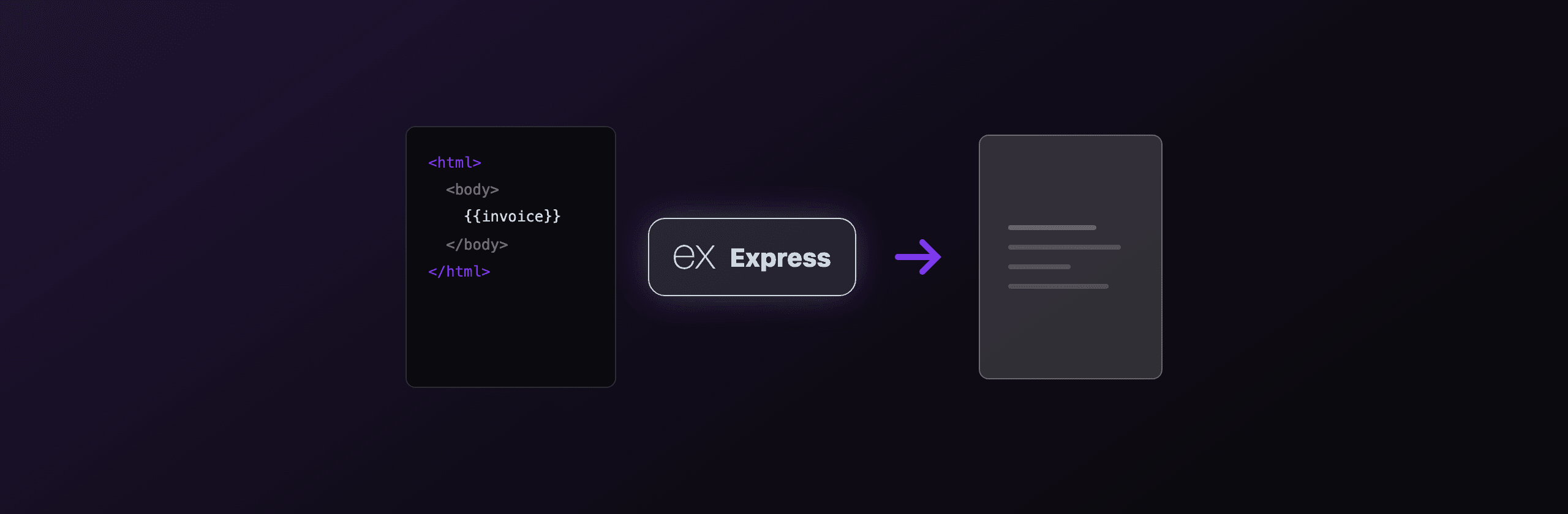
PDF generation in Express.js comes down to four working options: render HTML with Puppeteer or Playwright (headless Chromium), draw vector content with pdfkit, build documents with @react-pdf/renderer, or call a hosted API so you never run a browser. If your PDF is HTML and CSS, Playwright or Puppeteer give the best fidelity. If you want zero infrastructure, PDF4.dev returns a PDF from a single POST.
Every option below ends the same way at the HTTP layer: you produce a Buffer, set the right headers, and send it from a route handler. The hard parts are choosing the renderer, keeping Chromium warm, and surviving serverless size limits. This guide covers all of it with real packages and real code.
Which PDF library should you use in Express.js?
Pick based on where your content starts and where you deploy. The table below maps each approach to the criteria that actually decide the call: input format, output fidelity, deploy footprint, and ongoing maintenance.
| Approach | Input | Fidelity | Deploy footprint | Best for |
|---|---|---|---|---|
| Puppeteer | HTML + CSS | Chromium-grade | ~170 MB Chromium, or @sparticuz/chromium on serverless | Existing HTML invoices, reports |
| Playwright | HTML + CSS | Chromium-grade | Bundled browsers, ~1 command install | HTML PDFs + screenshots in one tool |
| html-pdf-node | HTML + CSS | Chromium-grade (wraps Puppeteer) | Same as Puppeteer | Quick wrapper, less control |
| pdfkit | JS drawing calls | Pixel-exact, no CSS | ~1 MB, pure JS | Labels, badges, fixed layouts |
| @react-pdf/renderer | React components | Flexbox subset, no full CSS | ~3 MB, pure JS | React teams, structured docs |
| PDF4.dev (hosted) | HTML or template id | Chromium-grade | Zero (one HTTP call) | No browser to install or scale |
If your PDFs already exist as HTML pages or email templates, stay in the HTML to PDF lane (Playwright, Puppeteer, or PDF4.dev). Re-drawing the same layout in pdfkit doubles your maintenance for no visual gain.
How do you send a PDF from an Express route?
Produce the PDF as a Node Buffer, set Content-Type: application/pdf, set Content-Disposition, then send the buffer. attachment forces a download with a filename, inline opens it in the browser tab. This header contract is identical no matter which renderer produced the bytes.
import express from "express"

const app = express()

function sendPdf(res: express.Response, pdf: Buffer, filename: string) {
  res.set({
    "Content-Type": "application/pdf",
    "Content-Disposition": `attachment; filename="${filename}"`,
    "Content-Length": pdf.length.toString(),
  })
  res.end(pdf) // res.end avoids the extra string-encoding pass of res.send
}

app.get("/invoice/:id", async (req, res) => {
  const pdf = await renderInvoice(req.params.id) // any renderer below
  sendPdf(res, pdf, `invoice-${req.params.id}.pdf`)
})
Use inline instead of attachment for a print preview in the browser. Set Content-Length so the client shows an accurate progress bar. For multi-megabyte files, prefer streaming (covered in the pdfkit section) so you never hold the whole document in memory.
How do you generate a PDF in Express with Puppeteer?
Puppeteer launches headless Chromium, loads your HTML, and calls page.pdf(). It is the most common HTML to PDF path in Node.js because it renders the same engine your users see in Chrome. Install puppeteer for local and traditional servers, or puppeteer-core plus @sparticuz/chromium for serverless.
The one rule that matters for throughput: launch the browser once at startup, reuse it across requests, and open a fresh page per request. Launching Chromium per request adds roughly 300 to 800 ms of latency you do not need.
import express from "express"
import puppeteer, { type Browser } from "puppeteer"

let browserPromise: Promise<Browser> | null = null

// Singleton: one Chromium for the whole process, lazy-launched once.
function getBrowser(): Promise<Browser> {
  if (!browserPromise) {
    browserPromise = puppeteer.launch({
      headless: true,
      args: ["--no-sandbox", "--disable-dev-shm-usage"],
    })
  }
  return browserPromise
}

const app = express()
app.use(express.json())

app.post("/render", async (req, res) => {
  const browser = await getBrowser()
  const page = await browser.newPage()
  try {
    await page.setContent(req.body.html, { waitUntil: "networkidle0" })
    const pdf = await page.pdf({
      format: "A4",
      printBackground: true,
      margin: { top: "20mm", bottom: "20mm", left: "15mm", right: "15mm" },
    })
    res.set("Content-Type", "application/pdf").end(pdf)
  } finally {
    await page.close() // close the page, keep the browser warm
  }
})

app.listen(3000)
Honest caveats: printBackground: true is required or CSS backgrounds drop out. On a slim Docker base image you must install fonts yourself (see the fonts note below). On serverless you cannot keep a warm pool across invocations, so each cold start pays the full launch cost.
The default puppeteer package downloads a full Chromium of roughly 170 MB, which blows past the 50 MB zipped / 250 MB unzipped AWS Lambda limit. On Lambda or Vercel functions, use puppeteer-core with @sparticuz/chromium, which ships a Lambda-sized Chromium build. See the @sparticuz/chromium README for the exact pairing matrix.
How do you generate a PDF in Express with Playwright?
Playwright works like Puppeteer but installs its browsers with one command (npx playwright install chromium) and exposes the same page.pdf() API. Use it when you also need screenshots, multi-browser testing, or stricter wait conditions in the same dependency. PDF export only works in Chromium, which is fine for server-side rendering.
import express from "express"
import { chromium, type Browser } from "playwright"

let browser: Browser | null = null
async function getBrowser() {
  if (!browser) browser = await chromium.launch()
  return browser
}

const app = express()
app.use(express.json())

app.post("/render", async (req, res) => {
  const ctx = await (await getBrowser()).newContext()
  const page = await ctx.newPage()
  try {
    await page.setContent(req.body.html, { waitUntil: "load" })
    // emulate print media so @media print rules apply
    await page.emulateMedia({ media: "print" })
    const pdf = await page.pdf({ format: "A4", printBackground: true })
    res.set("Content-Type", "application/pdf").end(pdf)
  } finally {
    await ctx.close()
  }
})

app.listen(3000)
The emulateMedia({ media: "print" }) call makes @media print CSS rules apply, which matters for hiding navigation or showing page-break styles. Playwright's browser binaries are not bundled in your node_modules by default, so your Dockerfile must run the install step or copy the cached browsers. The trade-off versus Puppeteer is mostly ergonomic: same engine, slightly heavier install, better waiting primitives.
Can you generate a PDF without HTML using pdfkit?
Yes. pdfkit builds PDFs from drawing calls (text, rect, image, moveTo) with no browser and no HTML. It is about 1 MB of pure JavaScript, so it deploys anywhere with zero binary dependencies. Use it for fixed-coordinate output like shipping labels, name badges, or tickets where you place every element by exact position.
pdfkit also streams natively, which is its biggest operational advantage: pipe the document straight to the response and memory stays flat regardless of page count.
import express from "express"
import PDFDocument from "pdfkit"

const app = express()

app.get("/label/:id", (req, res) => {
  const doc = new PDFDocument({ size: "A6", margin: 24 })

  res.set({
    "Content-Type": "application/pdf",
    "Content-Disposition": `inline; filename="label-${req.params.id}.pdf"`,
  })
  doc.pipe(res) // stream chunks to the client, no full Buffer in memory

  doc.fontSize(20).text("SHIP TO", { underline: true })
  doc.moveDown(0.5).fontSize(14).text("Acme Corp\n123 Market St\nLisbon, PT")
  doc.rect(24, 200, 240, 80).stroke()

  doc.end() // flushes and closes the response
})

app.listen(3000)
The cost is real: there is no CSS, no automatic text flow across complex layouts, and you compute coordinates by hand. A change a designer could make in 30 seconds of CSS becomes a code change. That is the deliberate trade for a 1 MB dependency that never launches a browser. See the pdfkit guide for the full drawing API.
Should you use @react-pdf/renderer in an Express API?
Use @react-pdf/renderer when your team writes React and your documents are structured (invoices, statements, reports). You describe pages with React components and a flexbox-based layout, then render to a stream or buffer on the server. It is pure JavaScript, around 3 MB, so it deploys without a browser binary.
// npm i @react-pdf/renderer
import { Document, Page, Text, View, renderToBuffer } from "@react-pdf/renderer"
import express from "express"

const app = express()

function Invoice({ id, total }: { id: string; total: string }) {
  return (
    <Document>
      <Page size="A4" style={{ padding: 40 }}>
        <View>
          <Text style={{ fontSize: 20 }}>Invoice {id}</Text>
          <Text style={{ marginTop: 12 }}>Total due: {total}</Text>
        </View>
      </Page>
    </Document>
  )
}

app.get("/invoice/:id", async (req, res) => {
  const pdf = await renderToBuffer(
    <Invoice id={req.params.id} total="$1,500.00" />
  )
  res.set("Content-Type", "application/pdf").end(pdf)
})

app.listen(3000)
The caveat is the layout engine. @react-pdf/renderer supports a subset of flexbox, not the full CSS your browser runs, so floats, grid, and many print-specific properties do not apply. Complex visual designs that already exist as HTML usually port more faithfully through Chromium than through a re-implemented layout. It shines for documents you build from scratch in a React codebase.
How do you generate a PDF in Express without managing a browser?
Call the PDF4.dev hosted API: POST your HTML (or a stored template id) to one endpoint and get a PDF back. There is no Chromium to install, no serverless size limit to fight, and no warm-pool code to maintain. PDF4.dev runs headless Chromium server-side and supports Handlebars {{variables}} so you can store a template once and pass data per request.
This is one option among the libraries above, not a replacement for all of them. It fits when you want HTML-grade fidelity but do not want to operate a browser inside your Express deploy.
curl -X POST https://pdf4.dev/api/v1/render \
  -H "Authorization: Bearer p4_live_xxx" \
  -H "Content-Type: application/json" \
  -d '{
    "html": "<h1>Invoice INV-001</h1><p>Total: $1,500.00</p>",
    "data": {},
    "delivery": "url"
  }'
With delivery: "url", the response is JSON { url, expires_at, size_bytes } and the URL serves the PDF for 24 hours, which keeps a large binary out of your response body. With delivery: "base64", you decode the buffer and stream it yourself as shown above. The trade-off is honest: you depend on an external service and a network hop instead of running the renderer in-process. In exchange you delete the Chromium dependency, the fonts setup, and the warm-pool plumbing from your codebase.
Want to see the output before writing any code? Paste markup into the free HTML to PDF toolTry it free, or convert a live page with Webpage to PDFTry it free. Both use the same Chromium engine as the API.
Why is my Express PDF missing fonts or showing emoji as boxes?
Headless Chromium renders only the fonts installed on the host machine. On a slim Docker image or a serverless runtime, the system has almost no fonts, so non-Latin text and emoji render as tofu boxes. The fix is to make fonts explicit rather than relying on the host.
Two reliable approaches:
- Install fonts in the image. On a Debian-based Dockerfile, add the families you need plus a color emoji font:
RUN apt-get update && apt-get install -y \
    fonts-liberation fonts-noto-core fonts-noto-color-emoji \
&& rm -rf /var/lib/apt/lists/*- Embed fonts in the HTML. Use
@font-facewith a base64 data URI or awoff2URL so the renderer never depends on system fonts at all. This is the most portable option because it works identically on every host.
The same root cause explains inconsistent output between local and production: your laptop has hundreds of fonts, your container has none. Pin fonts explicitly and the two environments match. A hosted renderer like PDF4.dev installs a standard font set server-side, which removes this class of bug from your deploy.
Which option should you choose?
Choose by where your content lives and how much infrastructure you want to own:
- You already have HTML/CSS templates and run a normal Node server: Playwright or Puppeteer with a warm browser-pool singleton. Best fidelity, you reuse your markup.
- You deploy to AWS Lambda or Vercel functions:
puppeteer-coreplus@sparticuz/chromium, or call PDF4.dev to skip the binary size fight entirely. - You draw fixed layouts (labels, badges, tickets) and want zero browser: pdfkit, streamed directly to the response.
- Your team writes React and builds structured documents:
@react-pdf/renderer. - You want HTML-grade output with no browser, no fonts setup, no scaling work: the hosted PDF4.dev API.
For most Express apps generating invoices, reports, or certificates from existing HTML, the decision is between running Chromium yourself (Playwright/Puppeteer) or calling a hosted endpoint (PDF4.dev). Both render the same engine. The only question is whether you want to operate the browser, the fonts, and the autoscaling, or send a POST and move on.
Next steps: read how to generate a PDF from HTML in Node.js for a deeper Puppeteer walkthrough, PDF generation in Next.js if you are on the App Router, or the complete HTML to PDF guide for the cross-framework picture.
Free tools mentioned:
Frequently asked questions
- How do you send a PDF from an Express route?
- Generate the PDF as a Node Buffer, then call res.set('Content-Type', 'application/pdf'), set Content-Disposition to attachment or inline, and res.send(buffer). For large files use res.end(buffer) or pipe a stream so memory stays bounded.
- Which library should I use for PDFs in Express.js?
- Use Puppeteer or Playwright when your PDF starts as HTML and CSS, because you reuse your existing markup. Use pdfkit or @react-pdf/renderer when you draw layouts programmatically with no HTML. Use a hosted API like PDF4.dev when you do not want to run Chromium yourself.
- Can you run Puppeteer on Vercel or AWS Lambda?
- Yes, but the default puppeteer package ships a full Chromium that exceeds typical serverless size limits. Use puppeteer-core with @sparticuz/chromium, which packages a Lambda-compatible Chromium binary under the unzipped size cap, or call a hosted rendering API instead.
- How do you avoid launching a new browser on every request?
- Launch one browser at startup and reuse it across requests by storing the instance in a module-level singleton. Open and close a fresh page per request, not a fresh browser. Launching Chromium costs roughly 300 to 800 ms, so a warm pool removes that from each response.
- Why is my Express PDF missing fonts or showing boxes for emoji?
- Headless Chromium only renders fonts installed on the host. On a slim Docker image, install the fonts you need plus a color emoji font, or embed web fonts with @font-face and base64 data URIs so the renderer never depends on system fonts.
- How do you stream a large PDF instead of buffering it in memory?
- With pdfkit, pipe the document straight to the response: doc.pipe(res) then doc.end(). With Chromium-based tools you usually get a full Buffer, so for very large outputs render to a URL and redirect, or store the file and stream it back in chunks.
- Is HTML to PDF or programmatic drawing better in Express?
- HTML to PDF wins when designers already maintain the layout in HTML and CSS, which covers invoices, reports, and certificates. Programmatic drawing with pdfkit wins for fixed-coordinate output like labels and badges where you control every millimeter and want zero browser dependency.
Start generating PDFs
Build PDF templates with a visual editor. Render them via API from any language in ~300ms.