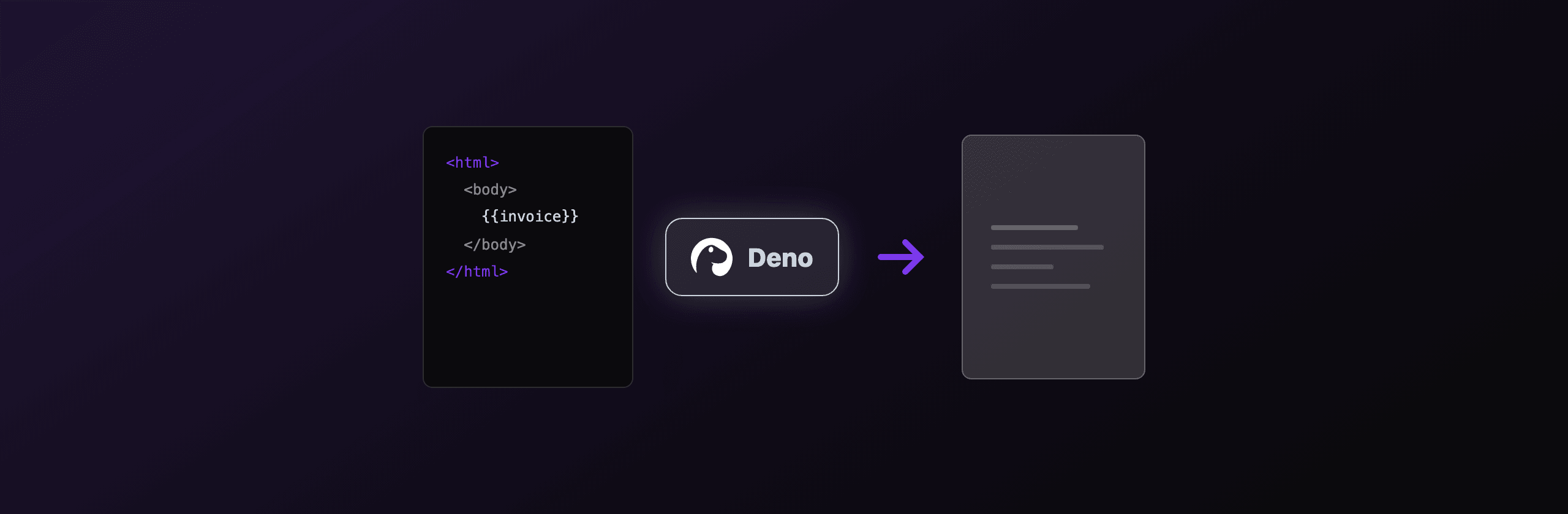
Deno generates PDFs through four working paths in 2026: Astral (the Deno-native Chromium driver) for HTML to PDF, Puppeteer or Playwright via npm: specifiers for the same job with a larger ecosystem, pdf-lib or jsPDF for drawing PDFs without a browser, and a hosted API like PDF4.dev when you do not want to ship Chromium at all. If you need pixel-accurate HTML and CSS, use a headless Chromium driver. If you run on Deno Deploy or any edge runtime, drop the local browser and use pdf-lib or a hosted API, because edge isolates have no Chromium binary.
This guide shows real code for each path, the exact --allow-* permission flags Deno needs, and how to return a PDF from Deno.serve.
Which PDF library should you use in Deno?
The right choice depends on one question: do you need to render HTML and CSS, or do you need to draw a layout yourself? HTML rendering needs a headless browser. Drawing does not. The table below maps each option to where it runs.
| Option | Type | HTML and CSS fidelity | Runs on Deno Deploy | Bundle or binary | Best for |
|---|---|---|---|---|---|
| Astral (JSR) | Headless Chromium | Full (Chromium engine) | No (no local browser) | ~170 MB browser download | Deno-native HTML to PDF |
Puppeteer (npm:) | Headless Chromium | Full (Chromium engine) | No (needs remote browser) | ~170 MB browser download | Largest ecosystem, examples |
Playwright (npm:) | Headless Chromium | Full (Chromium engine) | No (needs remote browser) | ~170 MB browser download | Cross-browser, auto-waiting |
pdf-lib (npm:) | Vector drawing | None (no HTML) | Yes (pure JS) | ~250 KB | Forms, edits, edge runtime |
jsPDF (npm:) | Vector drawing | Limited (basic html plugin) | Yes (pure JS) | ~350 KB | Simple receipts, labels |
| PDF4.dev | Hosted HTTP API | Full (Chromium server-side) | Yes (HTTP call) | 0 bytes | No infrastructure, edge-safe |
Astral, Puppeteer, and Playwright all drive the same Chromium engine, so their HTML to PDF output is visually identical. The difference is ergonomics and where you can run them, not rendering quality.
How do you generate a PDF from HTML in Deno with Astral?
Astral is the most Deno-native option: it is published on JSR, written for Deno with no Node.js compatibility shims, and exposes page.pdf() directly. Import it from jsr:@astral/astral, launch a browser, set HTML content, and call pdf(). Astral downloads its own Chromium on first launch.
// astral_pdf.ts
import { launch } from "jsr:@astral/astral";

const browser = await launch();
const page = await browser.newPage();

await page.setContent(`
  <!doctype html>
  <html>
    <body style="font-family: system-ui; padding: 40px">
      <h1>Invoice INV-2026-001</h1>
      <p>Total due: 1,500.00 EUR</p>
    </body>
  </html>
`);

const pdf = await page.pdf({ format: "A4", printBackground: true });
await Deno.writeFile("invoice.pdf", pdf);

await browser.close();
Run it with the permissions a browser driver needs:
deno run --allow-net --allow-read --allow-write --allow-env --allow-run astral_pdf.tsEach flag maps to a concrete need: --allow-net for the DevTools WebSocket and any remote assets, --allow-read and --allow-write for the browser cache and the output file, --allow-env for config lookups, and --allow-run to spawn the Chromium process. Astral honors the same printBackground, format, margin, and landscape options you know from Puppeteer.
How do you run Puppeteer or Playwright in Deno?
Import them with npm: specifiers and Deno resolves the package from npm directly, no package.json required. Puppeteer and Playwright both ship page.pdf() and produce the same Chromium output as Astral. Use them when you want the larger pool of Stack Overflow answers and existing examples, or Playwright's auto-waiting and cross-browser support.
// puppeteer_pdf.ts
import puppeteer from "npm:puppeteer";

const browser = await puppeteer.launch({ headless: true });
const page = await browser.newPage();

await page.setContent("<h1>Hello from Deno</h1>", { waitUntil: "load" });

const pdf = await page.pdf({
  format: "A4",
  printBackground: true,
  margin: { top: "20mm", bottom: "20mm", left: "15mm", right: "15mm" },
});

await Deno.writeFile("hello.pdf", pdf);
await browser.close();
Run either with the same permission set as Astral. The browser binary is not bundled with the npm package, so the first launch downloads roughly 170 MB of Chromium. For Puppeteer, set PUPPETEER_CACHE_DIR so the download lands in a path you control; for Playwright, run deno run -A npm:playwright install chromium once to fetch the binary ahead of time.
Cold start is real. A Chromium launch adds 300 to 800 ms before the first PDF. In a long-running Deno.serve process, launch one browser at boot and reuse it across requests instead of launching per request.
How do you draw a PDF in Deno without a browser?
Use pdf-lib or jsPDF when you control the layout and do not need HTML rendering. Both are pure JavaScript, so they import cleanly via npm: specifiers, need only --allow-read and --allow-write, and run on Deno Deploy where no Chromium exists. The trade-off: you position every element by coordinates instead of writing CSS.
// pdflib_draw.ts
import { PDFDocument, StandardFonts, rgb } from "npm:pdf-lib";

const doc = await PDFDocument.create();
const page = doc.addPage([595, 842]); // A4 in points
const font = await doc.embedFont(StandardFonts.Helvetica);

page.drawText("Receipt #4127", {
  x: 50,
  y: 780,
  size: 24,
  font,
  color: rgb(0.07, 0.09, 0.15),
});

page.drawText("Paid: 49.00 EUR", { x: 50, y: 740, size: 14, font });

const bytes = await doc.save();
await Deno.writeFile("receipt.pdf", bytes);
pdf-lib also opens existing PDFs to fill form fields, stamp watermarks, or merge pages, which makes it the right tool for editing rather than authoring from scratch. jsPDF carries an html() plugin, but it relies on html2canvas and rasterizes the page, so text stops being selectable and quality drops. For real HTML rendering, stay with a Chromium driver or a hosted API.
How do you return a PDF from a Deno HTTP server?
Build the PDF as a Uint8Array, then return it from Deno.serve with content-type: application/pdf. Deno's native HTTP server streams the bytes back. Set content-disposition to inline to preview in the browser or attachment to force a download.
// server.ts
import { launch } from "jsr:@astral/astral";

// Launch one browser at boot and reuse it across requests.
const browser = await launch();

Deno.serve({ port: 8000 }, async (req) => {
  const url = new URL(req.url);
  if (url.pathname !== "/invoice.pdf") {
    return new Response("Not found", { status: 404 });
  }

  const page = await browser.newPage();
  await page.setContent("<h1>Invoice INV-2026-001</h1>");
  const pdf = await page.pdf({ format: "A4", printBackground: true });
  await page.close();

  return new Response(pdf, {
    headers: {
      "content-type": "application/pdf",
      "content-disposition": "inline; filename=invoice.pdf",
      "content-length": String(pdf.length),
    },
  });
});
Run it with deno run --allow-net --allow-read --allow-write --allow-env --allow-run server.ts. One browser is shared across requests, so only the first request pays the launch cost. Each request opens a fresh page, renders, and closes the page while the browser stays warm.
Why can't Deno Deploy generate PDFs with a local browser?
Deno Deploy runs your code in V8 isolates at the edge with no filesystem for a 170 MB Chromium binary and no permission to spawn subprocesses. That blocks Astral, Puppeteer, and Playwright, because all three need to launch a browser process. The same constraint applies to most edge runtimes, including Cloudflare Workers and Vercel Edge.
Three options work on Deno Deploy:
- Draw with pdf-lib or jsPDF. Pure JavaScript, no browser, runs in any isolate. You give up HTML and CSS rendering.
- Connect to a remote browser over WebSocket with
puppeteer.connect({ browserWSEndpoint }), pointing at a browser you host elsewhere or a browser-as-a-service endpoint. You keep HTML fidelity but now manage a browser fleet. - Call a hosted HTML to PDF API over HTTP. No browser, no binary, edge-safe. You POST HTML and get a PDF back.
If your PDFs are HTML-based and you deploy to the edge, a hosted API is the least code. A fetch call works in any isolate, so the same render path runs locally, on a VM, and on Deno Deploy without branching.
How do you generate a PDF in Deno with the PDF4.dev API?
POST your HTML or a template id to https://pdf4.dev/api/v1/render with a Bearer key and you get a PDF back, no Chromium to install or keep warm. PDF4.dev renders HTML server-side with headless Chromium (Playwright) and supports Handlebars {{variables}}, so the same call runs from a local script, a VM, or Deno Deploy. This is one option among the libraries above, not a replacement for them: pick it when you do not want to own PDF infrastructure.
A minimal request from Deno uses the built-in fetch, so it needs only --allow-net:
curl -X POST https://pdf4.dev/api/v1/render \
  -H "Authorization: Bearer p4_live_xxx" \
  -H "Content-Type: application/json" \
  -d '{
    "html": "<h1>Hello</h1>",
    "data": {},
    "delivery": "url"
  }'
Run with deno run --allow-net --allow-env pdf4_render.ts. The delivery: "url" mode returns a signed link that expires after 24 hours, which keeps large PDFs out of your response body and out of an agent's context window. Omit delivery to get the raw application/pdf bytes in the response instead.
Which option should you choose?
Match the option to your runtime and whether you render HTML. The short version: Chromium driver for HTML fidelity on a server you control, pure-JavaScript drawing or a hosted API for the edge.
| Scenario | Recommended option |
|---|---|
| HTML to PDF, Deno-native, server or VM | Astral (jsr:@astral/astral) |
| HTML to PDF, want the biggest ecosystem | Puppeteer or Playwright (npm:) |
| Forms, watermarks, merging existing PDFs | pdf-lib (npm:pdf-lib) |
| Simple receipts and labels, no HTML | jsPDF (npm:jspdf) |
| Deno Deploy or any edge runtime, HTML-based | PDF4.dev hosted API |
| Do not want to manage a browser at all | PDF4.dev hosted API |
A practical default: start with Astral if you run a long-lived Deno server and your PDFs come from HTML. Move to a hosted API the moment you deploy to the edge or your team stops wanting to patch Chromium on every CVE. Keep pdf-lib in your toolbox for the editing jobs a browser cannot do, like filling an existing PDF form.
Want to test HTML to PDF before writing any Deno code? Try the free HTML to PDFTry it free and Webpage to PDFTry it free tools, paste your markup, and download the result in the browser.
Frequently asked questions
Do I need a package.json to import Puppeteer in Deno? No. Deno resolves npm:puppeteer directly from npm with no package.json and no node_modules install step. A cache directory is created on first run.
Is Astral or Puppeteer faster in Deno? Both drive the same Chromium engine, so render time is the same. Astral has a smaller dependency surface and no Node.js shim layer, which can shave a little startup time, but the PDF output is identical.
Can I run multiple browser drivers in production? Reuse a single browser instance across requests and open a fresh page per render. Launching a browser per request adds 300 to 800 ms of cold start each time and burns memory under load.
How do I keep my PDF4.dev key out of source? Read it from the environment with Deno.env.get("PDF4_API_KEY") and run with --allow-env. Never hardcode the p4_live_ key in a committed file.
Free tools mentioned:
Frequently asked questions
- Can Deno generate PDFs?
- Yes. Deno generates PDFs three ways: render HTML with a headless Chromium driver (Astral, or Puppeteer and Playwright via npm: specifiers), draw vector content with pdf-lib or jsPDF, or call a hosted API like PDF4.dev. The Chromium route gives the best HTML and CSS fidelity.
- How do I run Puppeteer in Deno?
- Import it with an npm specifier: import puppeteer from "npm:puppeteer". Run with the permission flags it needs: deno run --allow-net --allow-read --allow-write --allow-env --allow-run script.ts. Deno downloads the Chromium binary on first use the same way Node.js does.
- What is Astral in Deno?
- Astral is a Deno-first browser automation library published on JSR. It controls Chrome or Chromium over the DevTools protocol with no Node.js shims, downloads its own browser, and exposes a page.pdf() method, so it is the most Deno-native option for HTML to PDF.
- Can Deno Deploy generate PDFs?
- Not with a local browser. Deno Deploy edge isolates have no Chromium binary and block subprocess spawning, so Puppeteer, Playwright, and Astral cannot launch a browser there. Use a remote browser over WebSocket, draw with pdf-lib (pure JavaScript), or call a hosted API like PDF4.dev.
- Does pdf-lib work in Deno?
- Yes. pdf-lib is pure JavaScript with no native bindings, so it imports cleanly via npm:pdf-lib or esm.sh and runs everywhere Deno runs, including Deno Deploy. It draws text, shapes, and images and edits existing PDFs, but it does not render HTML or CSS.
- Which permission flags does PDF generation need in Deno?
- A Chromium driver needs --allow-net (DevTools socket and asset fetches), --allow-read and --allow-write (browser cache and output file), --allow-env (config), and --allow-run (spawn the browser process). pdf-lib needs only --allow-read and --allow-write for file IO.
- How do I return a PDF from Deno.serve?
- Build the PDF as a Uint8Array, then return new Response(bytes, { headers: { "content-type": "application/pdf", "content-disposition": "inline; filename=doc.pdf" } }). Deno.serve streams the bytes back with the correct MIME type.
Start generating PDFs
Build PDF templates with a visual editor. Render them via API from any language in ~300ms.