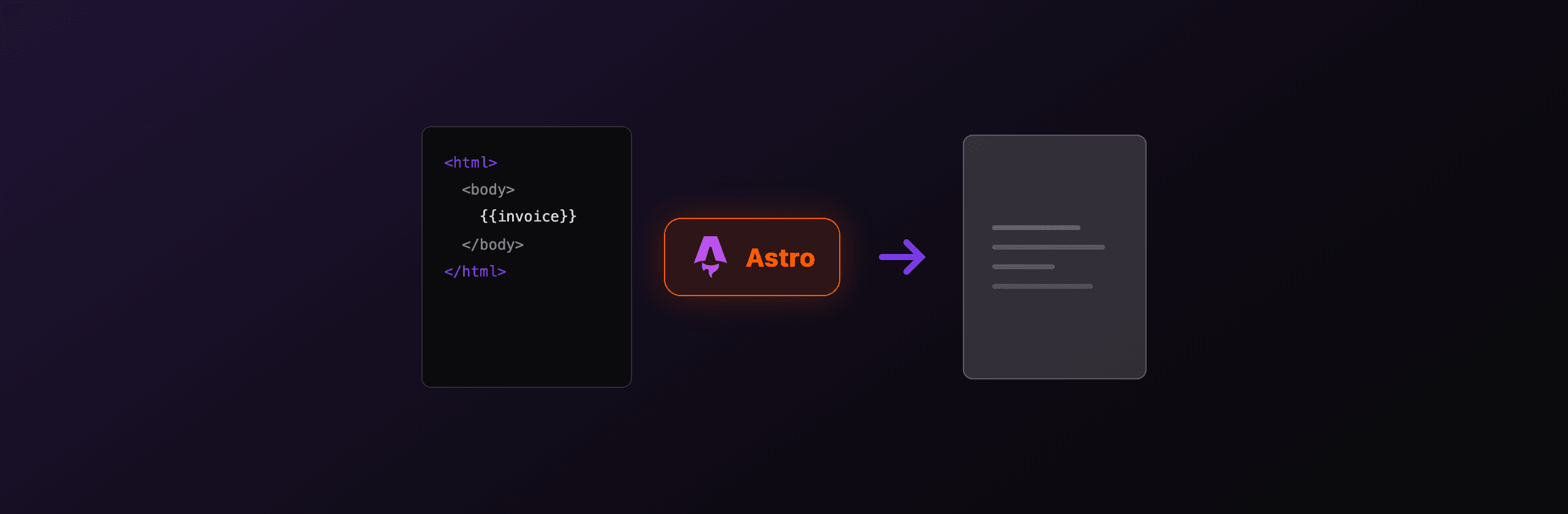
Generate a PDF in Astro with a server endpoint: create src/pages/invoice.pdf.ts, export a GET handler, render HTML with Playwright or Puppeteer (headless Chromium), and return a Response with Content-Type: application/pdf. This needs output: "server" (or a server-rendered route) plus a Node or platform adapter, because the default static build has no runtime to launch a browser. If you ship a static Astro site, render client-side with jsPDF or call a hosted API. The fastest no-infrastructure path is the hosted PDF4.dev API: POST your HTML, get a PDF back, ship no Chromium.
Which PDF option should you use in Astro?
The right choice depends on whether your route runs on a server, how close to print-perfect the output must be, and how much rendering infrastructure you want to own. Server-side Chromium gives the highest fidelity but needs a runtime. Client-side jsPDF runs anywhere but draws primitives by hand. A hosted API removes the runtime question entirely.
| Option | Where it runs | Fidelity (CSS, fonts) | Setup cost | Best for |
|---|---|---|---|---|
| Playwright endpoint | Server route (Node adapter) | High, full Chromium | Medium, ship Chromium | Invoices, reports, anything CSS-heavy |
| Puppeteer endpoint | Server route (Node adapter) | High, full Chromium | Medium, lighter than Playwright | PDF-only rendering, serverless |
| jsPDF (client) | Browser, any Astro build | Low, manual layout | Low | Receipts, badges, on-device export |
| PDF4.dev API | Any (static, SSR, edge) | High, hosted Chromium | Lowest, one POST | No-infra teams, agents, static sites |
Fidelity means how well the output matches your HTML and CSS. Headless Chromium (Playwright, Puppeteer, PDF4.dev) renders flexbox, grid, web fonts, and @media print rules. jsPDF positions text and shapes by coordinate, so complex layouts take more code.
How do you generate a PDF in an Astro server endpoint?
Create a file ending in .pdf.ts under src/pages, export a GET function, and return a Response whose body is the PDF buffer. Astro routes any src/pages/*.ts file that exports an HTTP method as an endpoint, and the .pdf in the filename becomes part of the URL, so src/pages/invoice.pdf.ts serves at /invoice.pdf.
The endpoint must run at request time, not at build time. Set export const prerender = false on the route, switch the project to output: "server" (or keep static and mark only this route server-rendered), and add the Node adapter so the handler has a runtime.
import { defineConfig } from "astro/config";
import node from "@astrojs/node";

export default defineConfig({
  output: "server",
  adapter: node({ mode: "standalone" }),
});
With output: "server", every route runs on the Node adapter by default, so you can drop prerender = false on the endpoint. If you keep output: "static" for the rest of the site, mark just this route with export const prerender = false so Astro keeps it dynamic. After installing Playwright, run npx playwright install chromium once so the browser binary exists in your environment.
How do you render HTML to PDF with Playwright in Astro?
Launch Chromium, set the page content to your HTML string, call page.pdf(), and return the buffer. Playwright's page.pdf() takes the same print options Chromium uses (format, margin, printBackground), so an A4 invoice with a background color is a few lines.
import type { APIRoute } from "astro";
import { chromium } from "playwright";

export const prerender = false;

const html = `<!doctype html>
<html><head><style>
  body { font-family: Inter, sans-serif; padding: 40px; color: #111827; }
  h1 { font-size: 24px; }
  .total { font-weight: 700; font-size: 20px; }
</style></head>
<body>
  <h1>Invoice INV-001</h1>
  <p>Acme Corp</p>
  <p class="total">Total: 1,500.00 USD</p>
</body></html>`;

export const GET: APIRoute = async () => {
  const browser = await chromium.launch();
  try {
    const page = await browser.newPage();
    await page.setContent(html, { waitUntil: "load" });
    const pdf = await page.pdf({
      format: "A4",
      printBackground: true,
      margin: { top: "20mm", bottom: "20mm", left: "15mm", right: "15mm" },
    });
    return new Response(pdf, {
      headers: {
        "Content-Type": "application/pdf",
        "Content-Disposition": 'inline; filename="invoice.pdf"',
      },
    });
  } finally {
    await browser.close();
  }
};
Honest caveats: launching a fresh Chromium per request adds 200 to 500 ms, so reuse one browser instance across requests in production. Bundled Playwright Chromium is around 150 MB, which exceeds many serverless function size limits. For serverless, swap to the @sparticuz/chromium build (next section). Web fonts must be reachable at render time, so self-host or link a Google Fonts URL inside the HTML, otherwise the PDF falls back to a default font.
How do you run Puppeteer for PDF on serverless Astro?
Use puppeteer-core with @sparticuz/chromium so the function stays under the platform size limit. The full puppeteer package downloads its own Chromium (over 100 MB), which breaks AWS Lambda, Vercel, and Netlify function bundles. puppeteer-core ships no browser, and @sparticuz/chromium provides a compressed Chromium built for serverless.
import type { APIRoute } from "astro";
import chromium from "@sparticuz/chromium";
import puppeteer from "puppeteer-core";

export const prerender = false;

export const GET: APIRoute = async () => {
  const browser = await puppeteer.launch({
    args: chromium.args,
    executablePath: await chromium.executablePath(),
    headless: true,
  });
  try {
    const page = await browser.newPage();
    await page.setContent("<h1>Quarterly report</h1>", {
      waitUntil: "networkidle0",
    });
    const pdf = await page.pdf({ format: "A4", printBackground: true });
    return new Response(pdf, {
      headers: { "Content-Type": "application/pdf" },
    });
  } finally {
    await browser.close();
  }
};
Honest caveats: the cold start that decompresses Chromium adds 2 to 5 seconds and 250 to 500 MB of memory, so set the function memory to at least 512 MB. Cloudflare Workers cannot run this Chromium build because there is no Node filesystem to unpack the binary, so on Cloudflare use the Browser Rendering binding or a hosted API instead. Pin @sparticuz/chromium to the major version that matches your puppeteer-core, since a mismatch causes the browser to fail to launch.
How do you turn a rendered .astro page into a PDF?
Render the .astro page as HTML first, then feed that HTML to the browser. The cleanest pattern is to fetch the page's own URL from inside the endpoint, read the response body as text, and pass it to page.setContent(). This reuses your existing Astro components and styles instead of duplicating the markup in a string.
import type { APIRoute } from "astro";
import { chromium } from "playwright";

export const prerender = false;

export const GET: APIRoute = async ({ params, url }) => {
  // Fetch the on-screen invoice page (an .astro route) as HTML.
  const pageUrl = new URL(`/invoice/${params.id}`, url.origin);
  const res = await fetch(pageUrl);
  const html = await res.text();

  const browser = await chromium.launch();
  try {
    const page = await browser.newPage();
    await page.setContent(html, { waitUntil: "networkidle" });
    // Use the print stylesheet for the PDF layout.
    await page.emulateMedia({ media: "print" });
    const pdf = await page.pdf({ format: "A4", printBackground: true });
    return new Response(pdf, {
      headers: { "Content-Type": "application/pdf" },
    });
  } finally {
    await browser.close();
  }
};
Add a @media print block to the page so the PDF drops the navigation, sidebar, and buttons that only make sense on screen. The emulateMedia({ media: "print" }) call activates those rules during rendering. If the page loads images or fonts from your own origin, keep waitUntil: "networkidle" so they finish loading before the snapshot.
Fetching your own origin from inside an endpoint works locally, but on some serverless platforms a function cannot call back into the same deployment during a cold start. If you hit that, render from a stored HTML string or move rendering to a hosted API.
How do you generate a PDF client-side in Astro with jsPDF?
Use jsPDF inside a client script when the PDF is simple and you want zero server cost. jsPDF runs entirely in the browser, so it works on a fully static Astro build with no adapter and no server route. The tradeoff is that jsPDF draws text and shapes at coordinates you specify, so it suits receipts, tickets, and badges more than CSS-heavy invoices.
<button id="dl">Download receipt</button>

<script>
  import { jsPDF } from "jspdf";

  document.getElementById("dl")?.addEventListener("click", () => {
    const doc = new jsPDF({ unit: "pt", format: "a4" });
    doc.setFontSize(20);
    doc.text("Receipt", 40, 60);
    doc.setFontSize(12);
    doc.text("Order #1042", 40, 90);
    doc.text("Total: 49.00 USD", 40, 110);
    doc.save("receipt.pdf");
  });
</script>
Honest caveats: jsPDF has no HTML layout engine. Its html() method exists but relies on html2canvas, which rasterizes the page into an image, so text becomes non-selectable and fonts can look soft. For multi-column layouts, tables, or page breaks, the manual coordinate API gets verbose fast. If your document is a styled invoice or report, server-side Chromium or a hosted API gives a cleaner result with less code.
How do you generate a PDF from Astro with the PDF4.dev API?
POST your HTML to https://pdf4.dev/api/v1/render with a Bearer API key and read back a PDF URL or bytes. PDF4.dev renders the HTML with headless Chromium on its own servers, so your Astro app ships no browser binary, fights no serverless cold start, and works the same on a static build, an SSR route, or an edge function. You send HTML (or a saved template_id with data), it returns the PDF.
curl -X POST https://pdf4.dev/api/v1/render \
  -H "Authorization: Bearer p4_live_xxx" \
  -H "Content-Type: application/json" \
  -d '{
    "html": "<h1>Invoice INV-001</h1><p>Total: 1,500.00 USD</p>",
    "data": {},
    "delivery": "url"
  }'
The delivery: "url" mode returns a signed link instead of the binary, which keeps your serverless response small and works well when an AI agent or a browser needs the file. Set delivery: "base64" to get the bytes inline. Store the key in an environment variable (PDF4_API_KEY), and call the endpoint from a server route or serverless function so the key never reaches the browser. The same {{variable}} template syntax means a designer can edit the invoice layout without a redeploy.
Want to try the rendering engine before wiring code? Paste markup into our free HTML to PDFTry it free tool, or capture a live page with Webpage to PDFTry it free. Both run the same headless Chromium pipeline the API uses.
Which option should you choose for your Astro project?
Pick by where your route runs and how much infrastructure you want to own. The four options solve different constraints, so match them to your scenario rather than defaulting to one.
| Your scenario | Recommended option |
|---|---|
| SSR Astro site, CSS-heavy invoices or reports | Playwright endpoint with a reused browser instance |
| Serverless deploy (Vercel, Netlify, Lambda) | Puppeteer-core with @sparticuz/chromium |
| Fully static Astro build, simple receipts | jsPDF in a client script |
| No infra, static or edge, or AI agents | PDF4.dev API |
If you run a long-lived Node server, a self-hosted Playwright endpoint is the lowest cost per render once the browser is warm. If you deploy to functions, the cold-start and memory overhead of bundling Chromium is real, and a hosted API often comes out cheaper than paying for 1 GB functions that idle. If your site is static and your documents are simple, jsPDF keeps everything in the browser. When you would rather ship features than maintain a browser pool, PDF4.dev removes the rendering layer entirely: one POST, one PDF, no Chromium in your build.
Common pitfalls and how to avoid them
The two errors that account for most failed Astro PDF setups are a prerendered route and an oversized serverless bundle. Both have a one-line fix.
- Endpoint returns HTML, not a PDF. The route is static. Add
export const prerender = falseand a server adapter (@astrojs/node,@astrojs/vercel,@astrojs/netlify, or@astrojs/cloudflare). - Function exceeds the size limit. You bundled full
playwrightorpuppeteer. Switch topuppeteer-coreplus@sparticuz/chromium, or move rendering off-box to a hosted API. - Wrong or missing fonts in the output. The font was not loaded at render time. Self-host the font, inline an
@font-face, or add a Google Fonts link in the HTML head, then wait fornetworkidlebefore callingpage.pdf(). - Backgrounds and colors are blank. Chromium strips backgrounds in print mode by default. Set
printBackground: true. - Browser never closes on serverless. A leaked Chromium process pins memory across invocations. Wrap rendering in
try/finallyand always callbrowser.close().
For the full PDF4.dev request and response shape, see the render endpoint reference. For Astro endpoint and adapter details, the Astro endpoints docs and on-demand rendering docs are the source of truth. Headless PDF options match the Chrome DevTools Protocol Page.printToPDF parameters.
If you also need to combine, split, or compress the PDFs you produce, our free browser-based tools cover Merge PDFTry it free, Split PDFTry it free, and Compress PDFTry it free, with no upload to a server.
Free tools mentioned:
Frequently asked questions
- Can you generate a PDF in Astro?
- Yes. The most reliable path is an Astro server endpoint (a .pdf.ts file exporting GET) that renders HTML with headless Chromium via Playwright or Puppeteer and returns a Response with the application/pdf content type. This needs output: server (or a server-rendered route) plus a Node adapter so the route runs on a server instead of being prerendered to static HTML.
- Does Astro PDF generation work on a static site?
- Not with a server-side headless browser. A static Astro build has no server runtime, so it cannot run Chromium. Two options work on a static site: render the PDF client-side with jsPDF in the browser, or call a hosted API like PDF4.dev from the browser or an edge function and get the PDF bytes back.
- Should I use Playwright or Puppeteer in Astro?
- Both produce the same Chromium-quality PDF. Puppeteer is lighter if you only need PDF rendering. Playwright covers more browsers and ships a richer automation API. On serverless platforms, pair either with @sparticuz/chromium because the bundled full Chromium download is too large for most function size limits.
- Why does my Astro PDF endpoint return HTML instead of a PDF?
- The route is being prerendered to static HTML, so the GET handler never runs at request time. Set export const prerender = false on the endpoint, configure output: server or hybrid, and install a server adapter (Node, Vercel, Netlify, or Cloudflare) so Astro keeps the route server-rendered.
- How do I send an Astro page's rendered HTML to a PDF?
- Fetch the page URL from your endpoint, read the HTML body, then pass that HTML to page.setContent() in Playwright or Puppeteer, or to the html field of the PDF4.dev render call. Add a print stylesheet so the PDF layout differs from the on-screen layout.
- How much does server-side PDF rendering cost on serverless?
- A cold start that loads @sparticuz/chromium adds roughly 2 to 5 seconds and 250 to 500 MB of memory, so size your function for at least 512 MB to 1024 MB. A warm invocation renders a one-page invoice in about 300 to 800 ms. A hosted API removes the cold-start and memory cost entirely.
- Can AI agents generate PDFs from an Astro app?
- Yes. PDF4.dev exposes a REST endpoint and an MCP server, so an agent can POST HTML or a template id and receive a PDF URL. From Astro you call the same POST https://pdf4.dev/api/v1/render endpoint from a server route or a serverless function.
Start generating PDFs
Build PDF templates with a visual editor. Render them via API from any language in ~300ms.