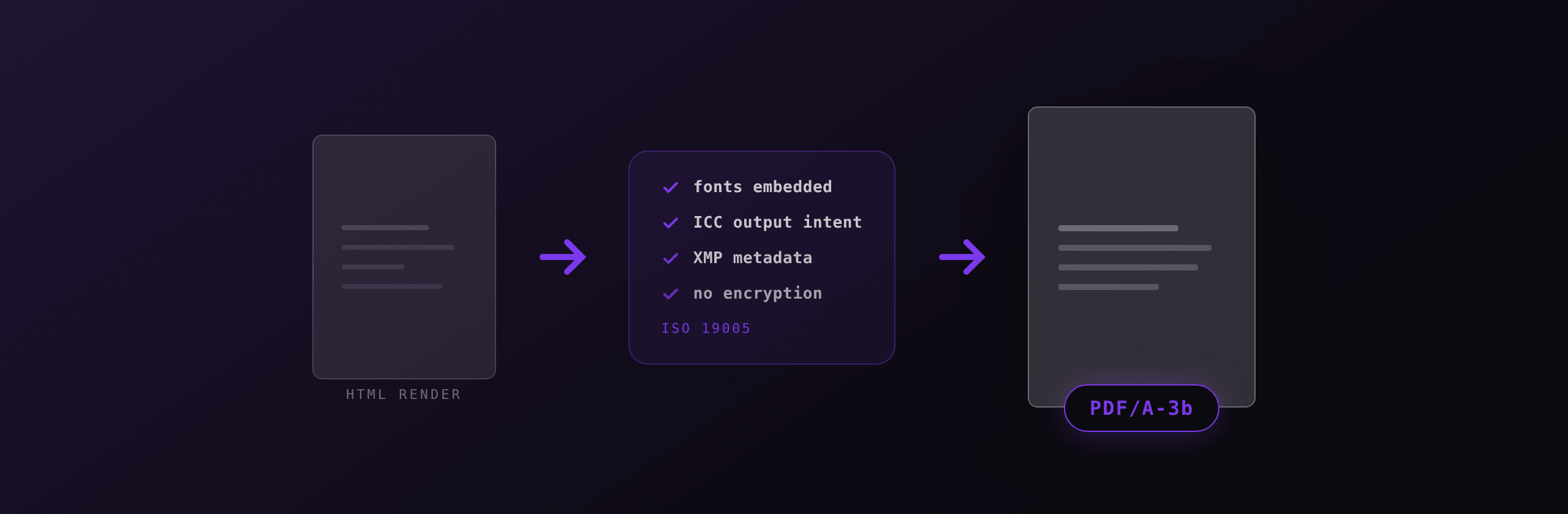
PDF/A is a restricted profile of PDF, standardised as ISO 19005, that guarantees a document will still render correctly decades after the software that produced it disappears. It achieves that by banning anything that reaches outside the file: non-embedded fonts, encryption, JavaScript, external media, and undefined colour.
A regular PDF can look perfect today and render as blank boxes in 2050 because it referenced a font that was installed on the author's machine. PDF/A closes that gap. This guide covers what each part of the standard allows, how the conformance levels differ, and how to convert and validate files yourself.
What does PDF/A actually forbid?
PDF/A forbids six categories of content. Every rule exists to remove a dependency on something outside the file.
| Forbidden | Why | What to do instead |
|---|---|---|
| Non-embedded fonts | The font may not exist on the future reader's system | Embed a subset of every face used |
| Encryption, including owner passwords | A lost key makes the archive unreadable | Encrypt at the storage layer |
| JavaScript and launch actions | Script engines change and are a security surface | Remove interactive behaviour |
| External content references | Linked files rot, servers disappear | Embed the content or drop it |
| Device-dependent colour with no output intent | 80 percent cyan has no fixed appearance | Attach an ICC output intent |
| Audio, video, and 3D (parts 1 to 3) | Codecs are not archivable | Keep media outside the archive |
Two things are required rather than forbidden: XMP metadata declaring the part and conformance level, and, when device colour spaces are used, an ICC output intent profile.
Which PDF/A part should you use?
Pick the part by what your consumer accepts, then pick the level by whether you need searchable text or full accessibility. There are four parts, published between 2005 and 2020.
| Part | ISO | Base PDF | Levels | Adds |
|---|---|---|---|---|
| PDF/A-1 | 19005-1:2005 | PDF 1.4 | 1a, 1b | Baseline. No transparency, no layers, no JPEG2000 |
| PDF/A-2 | 19005-2:2011 | PDF 1.7 | 2a, 2b, 2u | Transparency, layers, JPEG2000, PDF/A files embedded in PDF/A |
| PDF/A-3 | 19005-3:2012 | PDF 1.7 | 3a, 3b, 3u | Attachments of any file type, including XML and spreadsheets |
| PDF/A-4 | 19005-4:2020 | PDF 2.0 | 4, 4f, 4e | Cleaner model, Unicode mandatory, 4f for attachments, 4e for engineering |
PDF/A-1b remains the strictest and most widely accepted target, which is why national archives often still ask for it. PDF/A-3b is the practical default for anything that carries structured data alongside the human-readable page.
What the letters mean
The suffix is a separate axis from the part number.
- Level B (basic): the visual appearance of each page is preserved. Nothing is guaranteed about text extraction.
- Level U (Unicode): everything in B, plus every glyph maps to a Unicode code point. The file is reliably searchable and copyable.
- Level A (accessible): everything in U, plus a tagged structure tree, a defined reading order, and alternate text for images. This is what a screen reader needs.
Level A is considerably more work because it requires real semantic markup in the source document. If you generate PDFs from HTML, you already have most of the structure, which is covered in the guide on accessible tagged PDFs and EAA compliance.
PDF/A-4 replaced this scheme. There is a single base conformance level with Unicode mapping required, plus 4f when the file carries attachments and 4e for engineering documents with 3D content.
Why PDF/A-3 matters for e-invoicing
PDF/A-3 is the only pre-2020 part that permits arbitrary file attachments, which is exactly what hybrid e-invoice formats need. A Factur-X or ZUGFeRD invoice is a single file that a human opens as a normal page and a machine parses as embedded XML.
The attachment is declared with an AFRelationship key. For an invoice payload the value is Alternative in the Factur-X profile, meaning the XML is an alternative representation of the same content rather than a supplement. Validators check this key, so getting it wrong fails conformance even when the XML itself is correct.
If you are working through European mandates, the Factur-X and ZUGFeRD guide covers the profile levels and the French timeline, and the EU e-invoicing mandates guide covers the country-by-country picture.
Can headless Chromium produce PDF/A?
No. Headless Chromium, and therefore Playwright, Puppeteer, and every HTML-to-PDF service built on them, writes a standard PDF. It embeds fonts, which helps, but it does not attach an ICC output intent and does not write the XMP identification metadata that declares a conformance level. A validator will reject the output immediately.
WeasyPrint and Prince do not emit PDF/A natively either. Prince can be configured to produce PDF/A output with an explicit profile setting, which is the closest thing to native support among the HTML engines.
The realistic pipeline has three stages:
- Render HTML to a normal PDF with your existing tooling.
- Post-process the file into PDF/A with Ghostscript or a dedicated converter.
- Validate the result and fail the build if it does not conform.
How to convert a PDF to PDF/A with Ghostscript
Ghostscript is the standard open source path. It needs a small PostScript definition file that names the ICC profile and writes the XMP metadata.
# 1. Fetch an ICC profile and the definition template
#    (Ghostscript ships PDFA_def.ps in lib/)
cp /usr/share/ghostscript/*/lib/PDFA_def.ps .

# 2. Edit PDFA_def.ps so ICCProfile points at your .icc file,
#    for example sRGB_IEC61966-2-1.icc

# 3. Convert
gs -dPDFA=3 \
   -dBATCH -dNOPAUSE \
   -sDEVICE=pdfwrite \
   -dPDFACompatibilityPolicy=1 \
   -sColorConversionStrategy=UseDeviceIndependentColor \
   -sOutputFile=invoice-pdfa.pdf \
   PDFA_def.ps invoice.pdf
Two flags decide whether this works. -dPDFA=3 selects the part, so use 1, 2, or 3 to match your target. -dPDFACompatibilityPolicy=1 tells Ghostscript to drop content it cannot make conformant rather than write a file that claims conformance it does not have. With the default policy of 0, Ghostscript will happily produce output that fails validation.
Ghostscript targets level B. It does not synthesise a tagged structure tree, so it cannot turn an untagged PDF into a level A file. Level A has to come from the source document.
How to validate with veraPDF
veraPDF is the open source validator built with the PDF Association and used by memory institutions. Run it in CI on every generated file.
# Validate a single file against PDF/A-3b
verapdf --flavour 3b invoice-pdfa.pdf

# Machine-readable report, non-zero exit on failure
verapdf --flavour 3b --format mrr invoice-pdfa.pdf > report.xml
The flavour argument takes the part and level joined together: 1b, 2u, 3b, 4, and so on. Store the report as a build artifact. If a document is challenged years later, the report is evidence that it conformed at the moment it was created.
The five failures you will actually hit
In practice, most validation errors fall into a short list.
- A font is not embedded. Usually caused by a CSS fallback such as
font-family: Arial, sans-serifresolving to a system face. Load fonts explicitly and check the resulting PDF with the font embedding guide. - No output intent. The Ghostscript definition file was not passed, or the ICC path in it is wrong.
- Transparency in a PDF/A-1 target. Any CSS
opacity,box-shadow, or PNG alpha channel breaks part 1. Move to part 2 or 3, or flatten the artwork. - XMP metadata missing or contradicting the document info dictionary. The title in XMP and the title in the info dictionary have to agree.
- An attachment in a part that does not allow it. Only PDF/A-3 and PDF/A-4f accept arbitrary embedded files.
For the flattening case, the free flatten PDF tool removes form fields and annotations in the browser, and the PDF metadata editor lets you inspect and correct the document info dictionary before conversion.
Where this fits in a generation pipeline
If you already generate documents from HTML templates, PDF/A is a post-processing step rather than a rewrite. The template work you do to satisfy the standard, embedding fonts and using semantic markup, also improves the non-archival output.
A typical setup looks like this:
// 1. Render the document from a template
const res = await fetch("https://pdf4.dev/api/v1/render", {
  method: "POST",
  headers: {
    Authorization: `Bearer ${process.env.PDF4_API_KEY}`,
    "Content-Type": "application/json",
  },
  body: JSON.stringify({
    template_id: "invoice",
    data: { invoice_number: "INV-2026-0412", total: "1,240.00" },
    delivery: "base64",
  }),
});

const { pdf_base64 } = await res.json();
await fs.writeFile("invoice.pdf", Buffer.from(pdf_base64, "base64"));

// 2. Convert to PDF/A-3b, 3. validate, in a shell step
// gs -dPDFA=3 ... -sOutputFile=invoice-pdfa.pdf PDFA_def.ps invoice.pdf
// verapdf --flavour 3b invoice-pdfa.pdf
PDF4.dev renders the document and gives you a deterministic PDF with fonts embedded, which removes the most common source of validation failures. The archival conversion stays in your pipeline, where you control the ICC profile and the retention policy.
Generating invoices, statements, or reports from HTML templates? Create a free PDF4.dev account and get an API key in under a minute. Fonts are embedded by default, so your files are one Ghostscript step away from PDF/A.
Practical recommendations
- Default to PDF/A-3b unless a specific regulator names another part. It accepts modern PDF features and allows attachments.
- Use PDF/A-1b only when a national archive or court filing system explicitly requires it, and expect to flatten transparency.
- Move to level A when accessibility is a requirement in its own right, not as an afterthought at conversion time.
- Validate in CI, not manually. A conformance claim you never test is a conformance claim you do not have.
- Keep the ICC profile in version control next to the definition file so conversions are reproducible.
PDF/A is not a different file format. It is the same PDF with a promise attached, and the promise is only worth something if you check it on every build.
Frequently asked questions
- What is PDF/A?
- PDF/A is a restricted profile of PDF standardised as ISO 19005 and designed for long-term archiving. It removes everything that makes a PDF depend on the outside world: fonts must be embedded, colour must be described by an ICC output intent, encryption and JavaScript are forbidden, and external file or media references are not allowed. A conforming file should render the same way in 30 years as it does today.
- What is the difference between PDF/A-1b and PDF/A-3b?
- PDF/A-1b is based on PDF 1.4 and forbids transparency, layers, and JPEG2000 images. PDF/A-3b is based on PDF 1.7, allows all of those, and additionally allows arbitrary file attachments of any format. The "b" in both means level B, which guarantees visual reproduction but not tagged structure. If you need embedded XML, such as a Factur-X or ZUGFeRD invoice, PDF/A-3b is the only pre-2020 option.
- What do the letters a, b, and u mean in PDF/A conformance levels?
- Level B (basic) guarantees the visual appearance of the page. Level U adds a requirement that all text has reliable Unicode mapping, so the file is searchable and copyable. Level A (accessible) adds everything in U plus a tagged logical structure tree and a defined reading order, which is what screen readers need. PDF/A-4, published in 2020, dropped the a/b/u letters and made Unicode mapping mandatory in the base level.
- Can Chrome or Playwright produce PDF/A directly?
- No. Headless Chromium writes a standard PDF without an ICC output intent and without the XMP identification metadata that declares conformance, so the output is not PDF/A even when the visual content would qualify. The usual pipeline is to render HTML to a normal PDF first, then post-process it with Ghostscript or a dedicated converter, then validate the result.
- How do I check whether a PDF is valid PDF/A?
- Use veraPDF, the open source validator developed with the PDF Association. The CLI form is `verapdf --flavour 3b invoice.pdf`, which returns a machine-readable report listing every failed clause of the specification. Adobe Acrobat Pro also has a Preflight profile for each PDF/A part, but veraPDF is the one you can run in CI.
- Does PDF/A make files larger?
- Usually yes, by a modest amount. Embedding font subsets typically adds 20 KB to 300 KB depending on how many typefaces and glyphs the document uses, and the ICC output intent profile adds a few hundred bytes to about 500 KB depending on which profile you attach. Files that already embed their fonts often grow by less than 5 percent.
- Is PDF/A required by law?
- It depends on the jurisdiction and the document type. It is not a general legal requirement, but many national archives, court e-filing systems, and public procurement portals mandate a specific part and level. The European hybrid e-invoicing formats Factur-X and ZUGFeRD require PDF/A-3, and several EU member states reference it in their e-invoicing rules.
- What is an output intent and why does PDF/A require one?
- An output intent is an embedded ICC colour profile that says how the numeric colour values in the file should be interpreted. Without it, a value such as 80 percent cyan has no defined appearance because it depends on the device. PDF/A requires an output intent whenever the file uses device-dependent colour spaces, so the colours stay reproducible after the original printing setup is gone.
- Can I put an encrypted or password-protected file in PDF/A?
- No. PDF/A forbids encryption entirely, including owner passwords that only restrict printing or copying. An archive that cannot be opened without a key that may be lost defeats the purpose of the standard. If you need both archival conformance and access control, apply the encryption outside the file, at the storage or transport layer.
- Should I use PDF/A-4 instead of PDF/A-3?
- Use PDF/A-4 if the systems that consume your files already accept it, because it is based on PDF 2.0 and has a cleaner conformance model. Use PDF/A-3 if you need broad compatibility today, especially for hybrid e-invoicing, where Factur-X and ZUGFeRD profiles still name PDF/A-3 in their published specifications.
Start generating PDFs
Build PDF templates with a visual editor. Render them via API from any language in ~300ms.