Two days ago a user fed our compress tool a 3.9 MB PDF and got a 24.7 MB file back. This article is the engineering story of what was wrong, how the rebuilt compressor works, and the browser APIs that make real PDF compression possible without a server: pdf-lib object surgery, native DecompressionStream inflation, PNG predictor reversal, and an OffscreenCanvas worker pipeline. All the code discussed here ships in the free PDF4.dev compress tool, where your files never leave the browser.
Why rasterizing pages is the wrong default
The original compressor did what most quick browser implementations do: render every page to a canvas with pdf.js, encode each canvas as a JPEG, and rebuild a new PDF from those images. That approach has one real use case, scanned documents, and it is destructive everywhere else.
A generated PDF stores text as font programs plus drawing commands, a few kilobytes per page. Rasterizing replaces that compact representation with a full-page bitmap: an A4 page at 150 DPI is roughly 1240 by 1754 pixels, and JPEG handles sharp text edges badly, so each page lands between 200 KB and 1 MB. A 3.9 MB text-and-vector document became 24.7 MB, a 527% increase, and lost selectable text, search, and links on the way.
The first fix was honesty: if the result is bigger than the input, return the original file and say so. The real fix was changing what "compress" means.
What actually takes space in a PDF
A PDF is a graph of numbered objects: pages, fonts, content streams, and image XObjects. In image-heavy files, the image streams dominate the byte count, and each one records exactly how it is encoded in its Filter entry (see the ISO 32000-2 specification).
| Filter | What it is | Browser decoder |
|---|---|---|
DCTDecode | A plain JPEG file embedded as-is | createImageBitmap |
FlateDecode | zlib-compressed raw pixels, optional PNG predictors | DecompressionStream plus manual unfiltering |
JPXDecode | JPEG 2000 | None |
CCITTFaxDecode, JBIG2Decode | 1-bit fax encodings from scanners | None |
The two filters with browser decoders cover the overwhelming majority of embedded images in the files we see: photos and scanner output are JPEG, and PNG-sourced graphics are Flate. That coverage is what makes in-place recompression viable client-side.
Recompressing images in place with pdf-lib
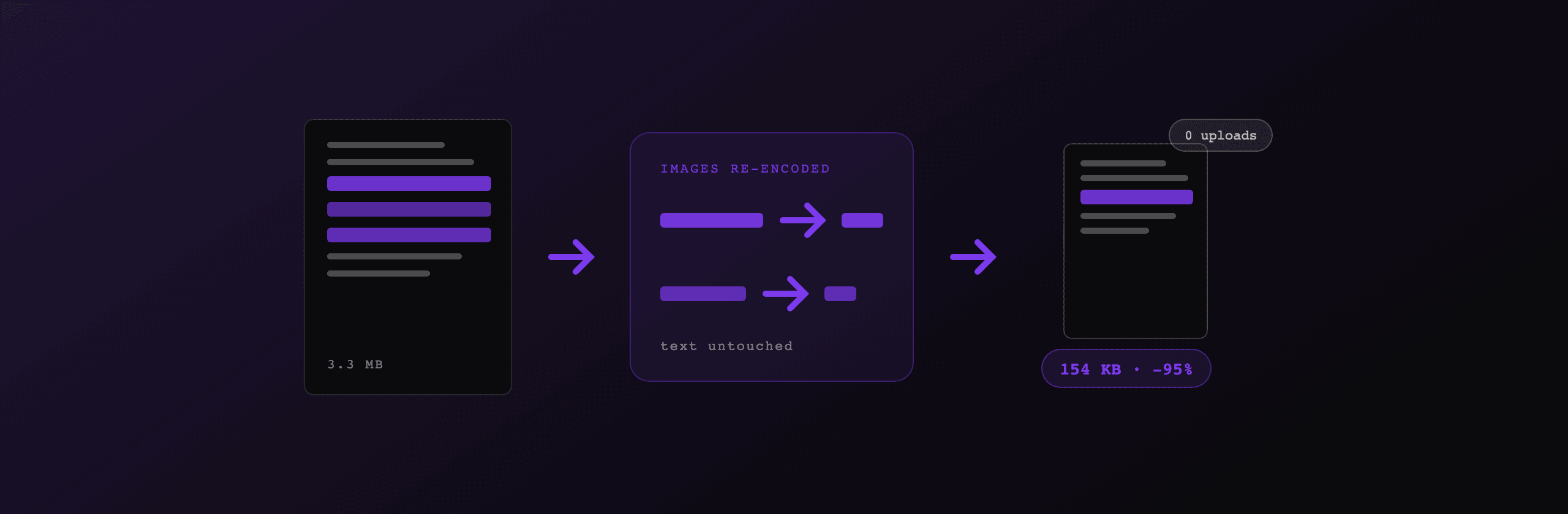
The compressor walks the object graph, finds every image stream, re-encodes it at the requested quality, and swaps the bytes under the same object reference. Nothing else in the file moves, which is why text stays selectable.
pdf-lib exposes the raw object table, so candidate collection is a filter over enumerateIndirectObjects:
const doc = await PDFDocument.load(originalBytes);

for (const [ref, obj] of doc.context.enumerateIndirectObjects()) {
  if (!(obj instanceof PDFRawStream)) continue;
  if (obj.dict.get(PDFName.of("Subtype")) !== PDFName.of("Image")) continue;
  // classify by Filter: DCTDecode → jpeg, FlateDecode → flate
  candidates.push({ ref, stream: obj });
}
Each candidate is decoded to a canvas, downscaled to a DPI-based cap, re-encoded as JPEG, and written back:
const newDict = doc.context.obj({
  Type: "XObject",
  Subtype: "Image",
  Width: w,
  Height: h,
  ColorSpace: "DeviceRGB",
  BitsPerComponent: 8,
  Filter: "DCTDecode",
});
doc.context.assign(ref, PDFRawStream.of(newDict, jpegBytes));
Three safety rules keep the output correct. Images referenced as a soft mask (SMask) are skipped so alpha channels stay lossless. Images carrying Decode arrays, color-key Mask entries, or ImageMask stencils are skipped because re-encoding would change how their bytes are interpreted. And every swap is conditional: if the re-encoded image is not smaller than the original stream, the original stays.
Decoding FlateDecode images with DecompressionStream
JPEG streams are the easy half: the bytes are a complete JPEG file, and createImageBitmap decodes them natively, including CMYK variants. FlateDecode streams are raw pixels behind zlib compression, and browsers now decompress that natively too:
async function inflate(bytes: Uint8Array): Promise<Uint8Array> {
  const stream = new Blob([bytes])
    .stream()
    .pipeThrough(new DecompressionStream("deflate"));
  return new Uint8Array(await new Response(stream).arrayBuffer());
}
The subtlety is predictors. A FlateDecode stream may filter each pixel row before compression using the exact scheme from the PNG specification: a leading filter byte per row selects None, Sub, Up, Average, or Paeth, and the decoder has to reverse it row by row. The stream dictionary announces this with Predictor (10 to 15 means PNG filters), Colors, and Columns. Reversing Paeth is 15 lines of arithmetic:
case 4: {
  const p = left + up - upLeft;
  const pa = Math.abs(p - left);
  const pb = Math.abs(p - up);
  const pc = Math.abs(p - upLeft);
  const pred = pa <= pb && pa <= pc ? left : pb <= pc ? up : upLeft;
  val = raw + pred;
  break;
}
After unfiltering, the raw RGB or grayscale bytes expand into an ImageData, land on a canvas, and follow the same downscale-and-encode path as JPEGs. Color spaces are resolved through the dictionary too: DeviceRGB and DeviceGray directly, ICCBased through its profile's component count. Exotic variants (16-bit channels, Indexed palettes, TIFF predictor 2) are skipped rather than risked.
A cascade that never returns a bigger file
Compression attempts run in a strict quality-first order, and every attempt has to beat a threshold to win:
- Recompress embedded images in place. Text survives, so any gain above 3% is accepted.
- Rasterize pages. Only for files the first stage cannot touch, mostly CCITT and JBIG2 scans. Because it destroys text, it must save at least 10%.
- Lossless re-save. pdf-lib rewrites the file with object streams and drops the XMP metadata stream and page thumbnails.
- Return the original. If nothing shrank the file, the user gets their exact input back, with a message saying why, never a bigger file.
The thresholds encode a value judgment: a 5% gain is not worth losing selectable text, but it is worth taking when text is preserved. The same reasoning drives the size estimates in the UI. Instead of a flat "output will be 38% of input" formula, the tool re-encodes the single largest embedded image at each quality level and extrapolates the measured ratio across all candidates, so the numbers under Light, Medium, and Strong come from your actual file.
Moving the pipeline off the main thread
Decoding and re-encoding megabytes of images is heavy, and on the main thread it freezes the page. The fix is OffscreenCanvas: it supports 2D contexts and convertToBlob inside Web Workers, so the whole image stage runs off-thread. The worker deliberately never loads pdf.js; when stage 1 alone cannot win, the client falls back to the main thread for rasterization and keeps the smaller of the two results. Browsers without Worker or OffscreenCanvas support get the original main-thread path unchanged.
The payoff is measurable. During compression of a 3.3 MB six-image PDF, a 10 ms interval probe on the main thread missed zero ticks, and the file finished in under a second.
What the numbers look like
Results from our test corpus, all on a laptop, all fully client-side:
| Input | Size before | Size after | Change | Path |
|---|---|---|---|---|
| 6-page PDF, six large JPEGs | 3.3 MB | 154.6 KB | -95% | images, in worker |
| 2-page PDF, one JPEG + one PNG | 612 KB | 88.6 KB | -86% | images (both filters) |
| 12-page text-only PDF | 13.8 KB | 13.8 KB | 0% | original returned |
Results are approximate and vary with image resolution, prior compression, and document structure. Text-heavy PDFs contain little image data, so the honest outcome for them is "no change" rather than an invented reduction.
The last row matters as much as the first two. A compressor that inflates or degrades files it cannot help loses trust on every text document, which is a large share of real-world PDFs.
What a browser still cannot do
Three limits remain, and they define the roadmap. CCITT and JBIG2 scans have no native decoder, so they take the rasterization path with its quality trade-off; a WebAssembly decoder would let them join stage 1. JPEG 2000 (JPXDecode) is in the same category but rarer. And the biggest lever for text-heavy files is font subsetting, stripping unused glyphs from embedded fonts, which needs a shaping library like HarfBuzz compiled to WebAssembly rather than image work.
Everything described here runs in the free Compress PDFTry it free tool. Open the network tab while it runs: the only traffic you will see is analytics, because the PDF itself never leaves your machine.
Free tools mentioned:
Frequently asked questions
- Can you really compress a PDF without uploading it?
- Yes. Modern browsers ship everything needed: pdf-lib parses the PDF object graph, createImageBitmap and canvas decode and re-encode images, DecompressionStream inflates zlib streams, and a Web Worker keeps it all off the main thread. The file never leaves the device.
- Why does rasterizing PDF pages make some files bigger?
- Rasterizing replaces compact vector and text data with a full-page bitmap. A text page that weighs a few kilobytes as fonts and drawing commands becomes a 200 KB to 1 MB JPEG at 150 DPI, so text-heavy PDFs grow instead of shrinking. Rasterization only pays off for scans.
- How do you compress a PDF without destroying the text?
- By swapping only the image streams inside the file. The compressor decodes each embedded DCTDecode or FlateDecode image, downscales and re-encodes it as JPEG, and writes it back under the same object reference. Fonts, text, and vector graphics are untouched, so text stays selectable.
- What is a PNG predictor in a PDF stream?
- FlateDecode streams can apply a per-row filter (None, Sub, Up, Average, Paeth) before deflate compression, the same scheme PNG uses. To get raw pixels back you inflate the stream, then reverse the filter row by row using the Predictor, Colors, and Columns values from the stream dictionary.
- How much can client-side compression shrink a PDF?
- It depends entirely on the images inside. On our test files, a 3.3 MB PDF built from six large JPEGs dropped 95%, and a 612 KB mixed file dropped 86%. A text-only PDF has nothing to recompress, so the honest result is returning the original file unchanged.
- Why run PDF compression in a Web Worker?
- Decoding and re-encoding megabytes of images blocks the main thread and freezes the page. OffscreenCanvas works inside workers, so the whole stage runs off-thread and the UI stays responsive. On our 3.3 MB test file the main thread missed zero ticks of a 10 ms probe during compression.
- What can a browser-based compressor not do?
- CCITT and JBIG2 fax encodings have no native browser decoder, so those scans fall back to page rasterization. Font subsetting, the main lever for text-heavy PDFs, needs a shaping library like HarfBuzz compiled to WebAssembly and is not covered by image recompression.
Start generating PDFs
Build PDF templates with a visual editor. Render them via API from any language in ~300ms.