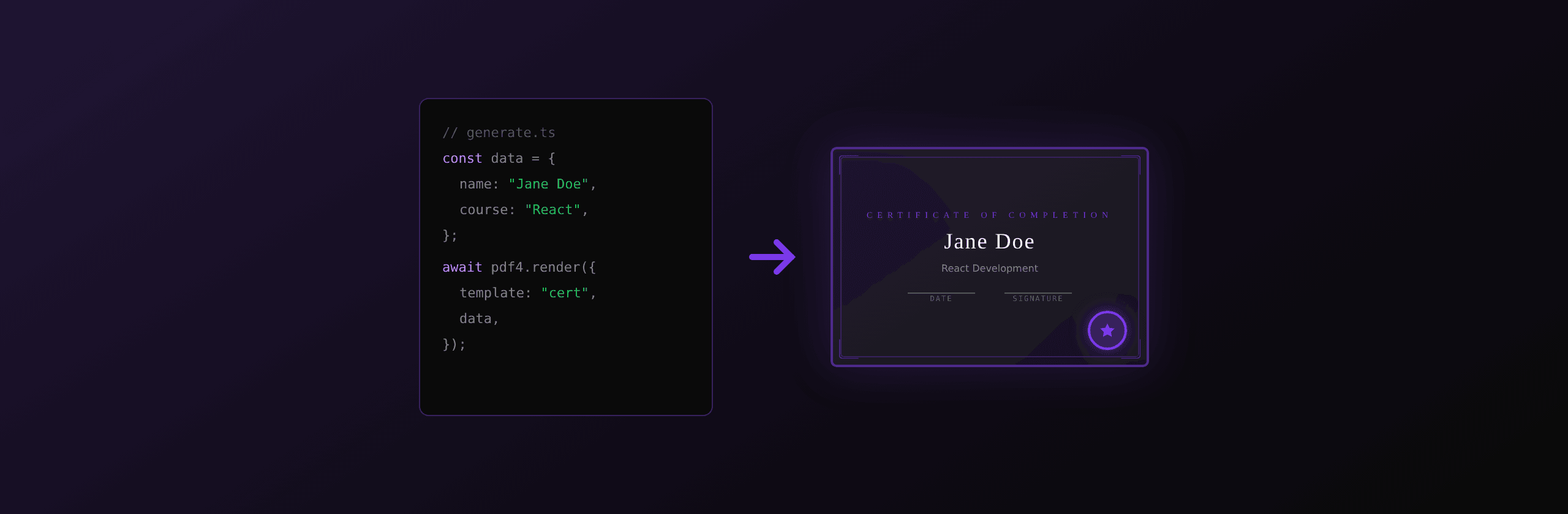
A PDF certificate generator takes structured data (recipient name, course title, date) and an HTML template, then produces a finished PDF in a single API call. Instead of manually editing a design file for each recipient, your application generates hundreds of certificates in minutes with consistent formatting.
Certificates show up everywhere: course completions, event attendance, employee training, awards, professional accreditations. The manual approach (open a design tool, type a name, export, repeat) breaks down past ten recipients. At a hundred, it takes a full day. At a thousand, it's not feasible.
| Approach | Setup time | Per-certificate time | Automation |
|---|---|---|---|
| Manual design tool (Canva, Word) | Minutes per certificate | 3-5 min each | None |
| PDF API (PDF4.dev) | 30 min one-time setup | 200-400ms each | Full |
| Self-hosted (Playwright + Docker) | Hours | 200-400ms each | Full, you manage infra |
How to design a certificate HTML template
A certificate template needs landscape orientation, elegant typography, a decorative border, and Handlebars variables for dynamic fields. Here is a complete template for PDF4.dev's a4-landscape preset:
<!DOCTYPE html>
<html>
<head>
  <meta charset="UTF-8">
  <style>
    * { box-sizing: border-box; margin: 0; padding: 0; }
    body {
      font-family: 'Inter', sans-serif;
      display: flex; align-items: center; justify-content: center;
      height: 100%; background: #fff;
    }
    .certificate {
      width: 100%; max-width: 900px; padding: 50px 60px;
      text-align: center; border: 3px double #7c3aed;
      border-radius: 4px; position: relative;
    }
    .certificate::before {
      content: ''; position: absolute; inset: 8px;
      border: 1px solid #e5e7eb; border-radius: 2px; pointer-events: none;
    }
    .label {
      font-size: 13px; text-transform: uppercase;
      letter-spacing: 4px; color: #7c3aed; margin-bottom: 8px;
    }
    .title {
      font-family: 'Playfair Display', serif; font-size: 36px;
      font-weight: 700; color: #111827; margin-bottom: 32px;
    }
    .subtitle { font-size: 14px; color: #6b7280; margin-bottom: 12px; }
    .recipient {
      font-family: 'Playfair Display', serif; font-size: 32px;
      font-weight: 600; color: #111827; border-bottom: 2px solid #7c3aed;
      display: inline-block; padding-bottom: 4px; margin-bottom: 24px;
    }
    .course { font-size: 18px; color: #374151; margin-bottom: 40px; line-height: 1.5; }
    .details {
      display: flex; justify-content: space-between; align-items: flex-end;
      margin-top: 40px; padding-top: 24px; border-top: 1px solid #e5e7eb;
    }
    .detail-label {
      font-size: 11px; text-transform: uppercase;
      letter-spacing: 2px; color: #9ca3af; margin-bottom: 4px;
    }
    .detail-value { font-size: 14px; color: #111827; font-weight: 500; }
    .signature-line { width: 180px; border-bottom: 1px solid #374151; margin-bottom: 4px; }
    .cert-id { font-size: 10px; color: #9ca3af; margin-top: 24px; letter-spacing: 1px; }
  </style>
</head>
<body>
  <div class="certificate">
    <div class="label">Certificate of Completion</div>
    <div class="title">{{certificate_title}}</div>
    <div class="subtitle">This is to certify that</div>
    <div class="recipient">{{recipient_name}}</div>
    <div class="course">
      has successfully completed<br>
      <strong>{{course_name}}</strong>
      {{#if hours}}<br>Duration: {{hours}} hours{{/if}}
    </div>
    <div class="details">
      <div>
        <div class="detail-label">Date</div>
        <div class="detail-value">{{formatDate date "long"}}</div>
      </div>
      <div style="text-align: center;">
        <div class="signature-line"></div>
        <div class="detail-label">{{signatory_title}}</div>
        <div class="detail-value">{{signatory_name}}</div>
      </div>
      <div style="text-align: right;">
        <div class="detail-label">Organization</div>
        <div class="detail-value">{{organization}}</div>
      </div>
    </div>
    <div class="cert-id">ID: {{certificate_id}}</div>
  </div>
</body>
</html>
The template uses Playfair Display for headings and Inter for body text. The double border with an inner ::before pseudo-element creates the classic certificate frame without image assets. All dynamic fields ({{recipient_name}}, {{course_name}}, {{date}}) are Handlebars variables replaced at render time. {{formatDate date "long"}} formats the date as "April 15, 2026" using the built-in helper.
How to create the template on PDF4.dev
The fastest path: sign in at pdf4.dev/dashboard, click "New template," paste the HTML, set the preset to A4 Landscape, and add the Google Fonts URL https://fonts.googleapis.com/css2?family=Playfair+Display:wght@600;700&display=swap in the Format panel.
For CI/CD pipelines where templates are version-controlled, create via API:
const response = await fetch('https://pdf4.dev/api/v1/templates', {
  method: 'POST',
  headers: {
    'Authorization': `Bearer ${process.env.PDF4_API_KEY}`,
    'Content-Type': 'application/json',
  },
  body: JSON.stringify({
    name: 'Course Certificate',
    html: certificateHtml,
    pdf_format: {
      preset: 'a4-landscape',
      margins: { top: '10mm', bottom: '10mm', left: '10mm', right: '10mm' },
      google_fonts_url:
        'https://fonts.googleapis.com/css2?family=Playfair+Display:wght@600;700&display=swap',
    },
    sample_data: {
      certificate_title: 'Professional Development',
      recipient_name: 'Jane Smith',
      course_name: 'Advanced TypeScript Patterns',
      hours: 40,
      date: '2026-04-15',
      signatory_name: 'Dr. Sarah Chen',
      signatory_title: 'Director of Education',
      organization: 'Tech Academy',
      certificate_id: 'CERT-2026-00042',
    },
  }),
});

const template = await response.json();
console.log('Template ID:', template.id);
How to generate a certificate via API
With the template created, generating a certificate is a single POST request with the recipient data.
const response = await fetch('https://pdf4.dev/api/v1/render', {
  method: 'POST',
  headers: {
    'Authorization': `Bearer ${process.env.PDF4_API_KEY}`,
    'Content-Type': 'application/json',
  },
  body: JSON.stringify({
    template_id: 'course-certificate',
    data: {
      certificate_title: 'Professional Development',
      recipient_name: 'Jane Smith',
      course_name: 'Advanced TypeScript Patterns',
      hours: 40,
      date: '2026-04-15',
      signatory_name: 'Dr. Sarah Chen',
      signatory_title: 'Director of Education',
      organization: 'Tech Academy',
      certificate_id: 'CERT-2026-00042',
    },
  }),
});

const pdf = Buffer.from(await response.arrayBuffer());
fs.writeFileSync('certificate-jane-smith.pdf', pdf);
The render takes 200-400ms. Because PDF4.dev renders with Chromium, the output matches what you see in a browser print preview: exact fonts, borders, and layout.
How to batch generate certificates from CSV
Batch processing is where an API-based generator pays off. A CSV with 200 attendees produces 200 PDFs in under 30 seconds.
recipient_name,course_name,hours,date,certificate_id
Jane Smith,Advanced TypeScript Patterns,40,2026-04-15,CERT-2026-00042
Alex Johnson,React Performance Workshop,16,2026-04-15,CERT-2026-00043
Maria Garcia,Node.js Security Fundamentals,24,2026-04-15,CERT-2026-00044
import { parse } from 'csv-parse/sync';
import * as fs from 'fs';
import JSZip from 'jszip';
async function generateCertificates(csvPath: string) {
const csv = fs.readFileSync(csvPath, 'utf-8');
const attendees = parse(csv, { columns: true, skip_empty_lines: true });
const zip = new JSZip();
const concurrency = 10;
for (let i = 0; i < attendees.length; i += concurrency) {
const batch = attendees.slice(i, i + concurrency);
const results = await Promise.allSettled(
batch.map(async (attendee) => {
const response = await fetch('https://pdf4.dev/api/v1/render', {
method: 'POST',
headers: {
'Authorization': `Bearer ${process.env.PDF4_API_KEY}`,
'Content-Type': 'application/json',
},
body: JSON.stringify({
template_id: 'course-certificate',
data: {
...attendee,
hours: parseInt(attendee.hours, 10),
certificate_title: 'Professional Development',
signatory_name: 'Dr. Sarah Chen',
signatory_title: 'Director of Education',
organization: 'Tech Academy',
},
}),
});
if (!response.ok) throw new Error(`${attendee.recipient_name}: failed`);
return {
name: attendee.recipient_name,
pdf: Buffer.from(await response.arrayBuffer()),
};
})
);
for (const r of results) {
if (r.status === 'fulfilled') {
const filename = `${r.value.name.replace(/\s+/g, '-').toLowerCase()}.pdf`;
zip.file(filename, r.value.pdf);
} else {
console.error('Failed:', r.reason);
}
}
}
const zipBuffer = await zip.generateAsync({ type: 'nodebuffer' });
fs.writeFileSync('certificates.zip', zipBuffer);
console.log(`${attendees.length} certificates saved to certificates.zip`);
}
generateCertificates('attendees.csv');The script sends 10 parallel requests per batch. Each batch completes in 200-400ms, so 200 certificates finish in about 20 batches (roughly 8-10 seconds of render time). PDF4.dev's dashboard also has a built-in batch feature: upload a CSV, map columns, and download a ZIP with no code.
How to secure generated certificates
Certificates are trust documents. Three measures prevent forgery and unauthorized distribution.
Watermarks for drafts. Add a diagonal "DRAFT" or "SAMPLE" overlay to preview copies. PDF4.dev's watermark tool applies text overlays to existing PDFs without re-rendering. See the watermark guide for options.
Password protection. Encrypt the final PDF so only the recipient can open it. Generate the certificate first, then pass the buffer through encryption. For details on RC4-128 (browser-side) vs AES-256 (qpdf), see the password protection guide.
Unique certificate IDs. Every certificate should include an ID like CERT-2026-00042 and optionally a verification URL (https://yoursite.com/verify/CERT-2026-00042). Store IDs in your database alongside recipient data so employers can verify authenticity.
How to adapt certificates for different use cases
The same template works for multiple certificate types by adjusting the data object. Use {{#if}} blocks for fields that only apply to certain types.
| Use case | Key variables | Notes |
|---|---|---|
| Course completion | course_name, hours, date | Include duration and instructor |
| Event attendance | event_name, event_date, location | Add event logo via base64 |
| Employee award | award_title, achievement | Bolder heading typography |
| Professional accreditation | credential, license_number, expiry | Show expiry date |
| Workshop participation | workshop_name, facilitator, skills | List specific skills |
Embed logos as base64 data URIs (data:image/png;base64,...) to avoid network dependency during rendering. This adds a few KB to the template but guarantees the image appears in every PDF.
PDF4.dev includes a certificate starter template in the dashboard. Sign up free and generate your first certificate in under two minutes.
FAQ
How do I generate PDF certificates programmatically?
Create an HTML template with Handlebars variables for recipient name, course title, date, and certificate ID. Then call PDF4.dev's render API with the template ID and recipient data. Each call returns a finished PDF in 200-400ms.
Can I generate certificates in bulk from a CSV file?
Yes. Parse the CSV into an array, then call the render API once per recipient. With 10 parallel requests, 200 certificates take under 30 seconds. Bundle results into a ZIP, or use PDF4.dev's built-in batch feature in the dashboard.
What paper size should certificates use?
Landscape A4 (297 x 210mm) is the standard. PDF4.dev supports this via the a4-landscape preset in the Format panel or { "preset": "a4-landscape" } in the API.
How do I use custom fonts like Playfair Display?
Add the Google Fonts URL to the google_fonts_url field in your template's pdf_format. PDF4.dev loads the font during rendering. Example: https://fonts.googleapis.com/css2?family=Playfair+Display:wght@600;700&display=swap.
Can I add a watermark to generated certificates?
Yes. Use PDF4.dev's watermark tool to overlay text like "SAMPLE" or "COPY" diagonally across each page after generating the PDF.
How do I prevent certificate forgery?
Three layers: password protection encrypts the file, flattening removes editable fields, and a unique certificate ID with a verification URL lets anyone confirm authenticity against your database.
Frequently asked questions
- How do I generate PDF certificates programmatically?
- Create an HTML template with Handlebars variables for recipient name, course title, date, and certificate ID. Then call a PDF rendering API like PDF4.dev with the template ID and recipient data. Each API call returns a finished PDF in 200-400ms.
- Can I generate certificates in bulk from a CSV file?
- Yes. Parse the CSV into an array of recipient objects, then loop over them and call the render API once per certificate. With parallel requests, 200 certificates take under 30 seconds. You can bundle the results into a ZIP for download.
- What paper size should certificates use?
- Landscape A4 (297 x 210mm) is the standard for certificates. It provides a wide format that matches the visual expectations of diplomas and awards. PDF4.dev supports this via the a4-landscape preset.
- How do I add a decorative border to a PDF certificate?
- Use CSS border with a double or solid style on a wrapper div. For more ornate borders, use a nested div approach with an outer border and inner padding area. The border renders identically in the PDF because the rendering engine is Chromium.
- How do I use custom fonts like Playfair Display in certificates?
- Add a Google Fonts URL to the google_fonts_url field in your template's pdf_format configuration. PDF4.dev loads the font during rendering, so your certificate uses the exact typeface you specified.
- Can I add a watermark to generated certificates?
- Yes. After generating the PDF, use PDF4.dev's watermark tool or the watermark-pdf API to overlay text like "SAMPLE" or "COPY" diagonally across each page. This is useful for preview copies or draft certificates.
- How do I prevent certificate forgery?
- Three layers help: password protection encrypts the file, flattening removes editable fields, and a unique certificate ID with a verification URL lets anyone confirm authenticity against your database.
- What data format works best for batch certificate generation?
- CSV is the simplest format for batch generation. Each row represents one recipient with columns for name, course, date, and any other variables. JSON arrays work equally well if your data comes from an API.
Start generating PDFs
Build PDF templates with a visual editor. Render them via API from any language in ~300ms.